
Hondata
Alphabit Software Inc.Tools
4.7265.00 Reviews
- Version
- 2.0.9
- Installs
- 10.00K
- Age Rating
- Everyone
Screenshots
Our Review of Hondata
 Analysis by Appyee
I’d think about Hondata differently in a household where more than one person uses the same car. It can turn a drive into a chance to understand what the engine is doing, but it isn’t simply a shared trip log or a general-purpose car dashboard. This is a specialist tool for people interested in Honda tuning, so its value depends on who is using it, what they expect from it, and whether they are prepared to treat performance adjustments with care.
When one car has several drivers
Picture a household where one person enjoys learning about engine behavior and another just wants the car to start reliably and get everyone where they need to go. The first driver may appreciate a real-time view while checking how the car responds in ordinary conditions. The second may have little reason to open a tuning app at all. That difference matters: a shared vehicle does not mean every driver should be expected to interpret or change its setup.
I’d keep the app’s role clear between drivers. Use monitoring as a way to observe, and treat any adjustment as a separate, deliberate decision rather than something to try casually before a commute. If one person makes a change, the others should know that the car’s behavior may have been altered. That simple handoff is more useful than assuming everybody understands what was changed.
Keep observation separate from changes
For a first look, I’d focus on watching the car during a familiar, routine drive instead of trying to tune it on the roadside. A steady route gives you a more useful point of comparison than an unusual trip with different traffic, weather, or driving style. If something looks unexpected, noting when it happened and what the car was doing is a sensible next step; making several adjustments at once makes it harder to know what helped or hurt.
This distinction is especially helpful for a shared car. A driver who is not comfortable with tuning can still leave the setup alone, while the person responsible for changes can make decisions with a clearer purpose. I would also avoid treating a screen reading as a complete diagnosis. Monitoring can help you notice a concern, but a number by itself does not establish why a problem is happening or whether a repair is needed.
Who will get value from it
The strongest fit is a Honda or Acura owner who already has a reason to pay attention to engine performance and is willing to learn before changing settings. It may also suit a household with one technically minded driver who can explain what the app is being used for and keep other drivers informed. The benefit is not just the possibility of customization; it is having a more involved way to observe how the car behaves.
I’d skip it if you want a simple maintenance reminder, a universal dashboard for any make, or an app that makes tuning decisions for you. If your main concern is an unfamiliar warning or a mechanical problem, a qualified mechanic or a vehicle-specific diagnostic route is a better starting point than experimenting with settings. And if nobody in the household wants to take responsibility for understanding the changes, the app’s tuning side is likely to be more burden than benefit.
How it differs from ordinary car tools
Most everyday car apps are aimed at reminders, trip records, or broad vehicle information. Hondata sits closer to the tuning end of the spectrum: it is built around performance monitoring and ECU-related work rather than serving as a neutral companion for every driver and every vehicle. That focus is its appeal, but it also narrows its audience. Someone looking only for routine ownership help may be better served by a basic maintenance tracker, while a Honda enthusiast may find those general tools too shallow for the questions they want to explore.
A practical trade-off is that more detail does not automatically mean more certainty. It can help you notice patterns, but interpreting them still takes care and context. I’d use the app to support informed observation, not as permission to chase a setting until the car feels faster or to ignore professional advice when something seems wrong.
Worth choosing for a household?
As a paid tools app from Alphabit Software Inc., it costs $9.99, so I’d weigh that against a real interest in Honda-focused monitoring rather than buying it just because several people share a car. It has a 4.7 average from around 1.1 thousand ratings, with over 10 thousand installs. Those figures suggest an established audience, but they do not change the main question: will someone in your household use its specialist capabilities responsibly?
It is rated for Everyone, and version 2.0.9 requires Android 6.0 or later. That age label is about content, not a sign that engine tuning is suitable for a child to manage. I would keep setup and adjustment decisions with a knowledgeable adult, explain to other drivers what the app is for, and avoid sharing access casually if it could lead to unintended changes. There is no need to turn it into a family-control system; clear expectations between the people who drive the car are the useful safeguard.
For a household with a Honda enthusiast who wants to monitor performance and is careful about modifications, I can see a solid reason to consider it. For a family looking for an easy all-purpose car app, I would choose something simpler. The best arrangement is one informed person handling tuning decisions and everyone else knowing when the vehicle’s setup has changed.
If you’ve ever been in the world of car tuning, the name Hondata might ring a bell. This app is a game-changer for anyone who wants to squeeze every bit of performance out of their Honda. So, let’s dive into what makes this app a must-have for car enthusiasts.
What is Hondata?
Alright, so imagine you’ve got this amazing car, but you know it can do more. That’s where Hondata steps in. It’s a software that allows you to recalibrate your Honda or Acura’s engine control unit (ECU). In simple terms, it means you can customize your car’s performance to match your needs, whether that’s for speed, efficiency, or just plain fun.
User-Friendly Experience
Let’s be real, not all of us are tech geniuses. Thankfully, the folks at Hondata have made this app pretty intuitive. The interface is clean and straightforward. Even if you’re a newbie, you won’t feel lost. The app guides you through the process, ensuring you’re not just randomly pressing buttons and hoping for the best.
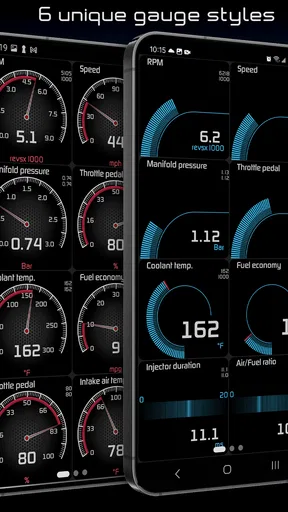
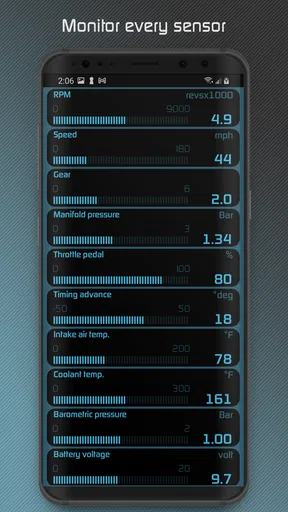
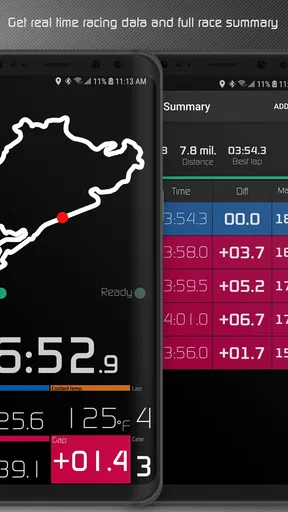
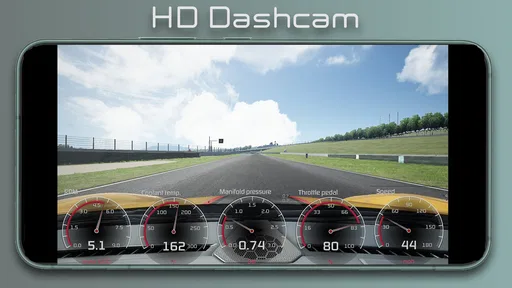
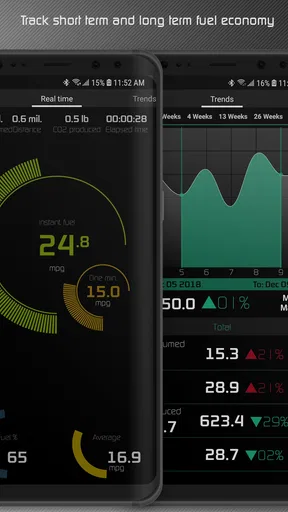
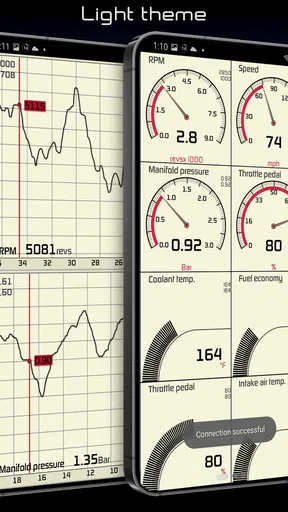
One of my favorite things is the dashboard. It provides real-time data on your car’s performance. You can see everything from fuel efficiency to engine temperature, all in one glance. It’s like having a mini control center right in your pocket.
Customizable Performance
Now, onto the fun part—customization. With Hondata, you can tweak the ECU to get the performance you desire. Want more power? You got it. Looking for better fuel economy? Easy peasy. The app offers numerous maps and parameters to play with.
The flexibility here is just amazing. You can adjust things like ignition timing, fuel delivery, and even tweak the turbo settings if your car has one. And the best part? You can save different setups and switch between them depending on your mood or driving conditions. It’s like having multiple cars in one.
Community and Support
One thing I’ve found super helpful is the community around Hondata. There are loads of forums and groups where users share tips, maps, and experiences. It’s a great way to learn and get the most out of the app. Plus, Hondata’s support team is pretty responsive, so if you hit a snag, they’ve got your back.
There’s also a wealth of tutorials and guides available. Whether you’re a beginner or a seasoned tuner, there’s always something new to learn. The community aspect really makes you feel like you’re part of a club, all united by a love of cars and performance.
Limitations and Considerations
Now, let’s talk about some things to keep in mind. While Hondata is fantastic, it’s important to know what you’re doing. Messing with the ECU can void warranties and potentially damage your car if done incorrectly. It’s not a toy, so take the time to understand the changes you’re making.
Also, the app is primarily designed for Honda and Acura vehicles, so if you’re driving something else, you might be out of luck. It’s always a good idea to double-check compatibility before diving in.
Final Thoughts
In conclusion, if you’re a Honda owner and passionate about performance tuning, Hondata is a must-have. It offers incredible customization options, a user-friendly interface, and a community ready to help you out. Just remember to tread carefully and enjoy the ride!
Verdict
Strengths of Hondata
- Boosts engine performance efficiently.
- User-friendly interface for quick tuning.
- Real-time data monitoring capabilities.
- Supports a wide range of vehicle models.
- Regular updates enhance functionality.
Limitations of Hondata
- Requires technical knowledge for setup.
- Limited compatibility with older models.
- Some features require additional hardware.
- Higher cost compared to similar apps.
- Occasional connectivity issues reported.
Similar Picks in This Category
View All
Google LLC4.0

Gboard - the Google Keyboard
Google LLC4.5

Google Play services
Google LLC4.3

Google Play Store
Google LLC4.9

Files by Google
Google LLC4.5

SHAREit: Transfer, Share Files
Smart Media4U Technology Pte.Ltd.4.3
Frequently Asked Questions
What is the main purpose of the Hondata app?
The Hondata app is designed to enhance the performance of your Honda or Acura vehicle. It allows users to tune and monitor engine parameters, providing real-time data and enabling custom settings for optimal performance. This app is ideal for car enthusiasts looking to maximize their vehicle's capabilities.
Is the Hondata app compatible with all Honda and Acura models?
The Hondata app is compatible with a wide range of Honda and Acura models, but not all. It’s essential to check the specific compatibility with your vehicle’s make and model on the Hondata website or app description before downloading to ensure it supports your car's ECU.
What features does the Hondata app offer?
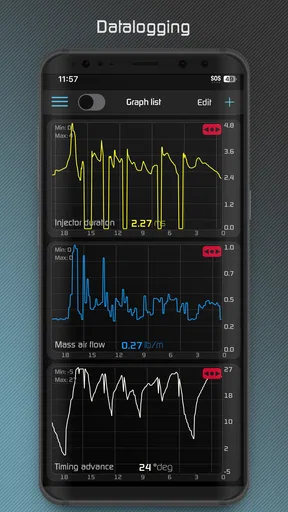
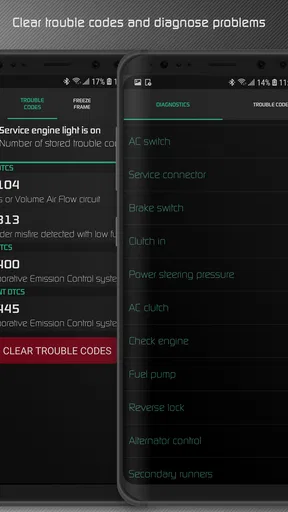
The Hondata app offers a variety of features including real-time data logging, engine monitoring, customizable tuning options, and performance enhancements. Users can adjust settings to improve horsepower, torque, and fuel efficiency, making it a versatile tool for both amateur and professional car tuners.
Does using the Hondata app void my car's warranty?
Using the Hondata app for tuning can potentially void your car's warranty, as modifications to engine parameters may not be covered. It is crucial to review your vehicle's warranty terms or consult with the manufacturer before making any changes that could affect your warranty status.
Is the Hondata app user-friendly for beginners?
While the Hondata app is packed with advanced features, it is designed with an intuitive interface that can be navigated by beginners. However, some tuning knowledge is beneficial. The app provides resources and tutorials to help new users understand and safely apply custom settings.
